Apple Announces 1.5 Billion Downloads In App Store

Apple announced yesterday that they have had a total of 1.5 billion app downloads on just over 65,000 apps. There App Storeare currently 40 million iPhones and iPod Touches that are able to run the App Store, and over 100,000 developers registered in the iPhone Developer program making all these apps.

Apple today announced that customers have downloaded more than 1.5 billion applications in just one year from its revolutionary App Store, the largest applications store in the world. The App Store is also growing at an incredible pace with more than 65,000 apps and more than 100,000 developers in the iPhone? Developer Program.

“The App Store is like nothing the industry has ever seen before in both scale and quality,” said Steve Jobs, Apple’s CEO. “With 1.5 billion apps downloaded, it is going to be very hard for others to catch up.”

Why Apple Need To Fix 3.0 Soon

With the vast collection of new features from the new iPhone OS 3.0, also came the vast amount of problems it’iphone_os_3s causing.

As a 3.0 user myself I have been affected by some of these, such as the WiFi connectivity issues which have caused hundreds of users problems.
The battery life using 3.0, for some has dropped drastically and I have myself seen a bit of a drop in the batteries performance.
Destructive video editing on the iPhone 3GS. which Apple has fixed in 3.1. Also some unknown problem with 3.0 which causes the device to over heat and the battery to drop drastically as I experienced whilst using Qik to live stream a video.

These are just a few problems that 3.0 users are having and Apple really needs to sort these out, as a lot of people rely on there iPhone to last throughout the day, we don’t want it to be like the Palm Pre do we. Hopefully these will be fixed in 3.1 and anyone using the 3.1 Beta feel free to drop a comment on if any of these problems, or others, have been fixed or even maybe caused by that update.

Apple Patents Changing Voice Output On The iPhone

Voice Output

This patent describes the ways to alter the voice output from the iPhone, such as the playback of audio files. Most would think this would be used for reading text from an eBook, but the patent suggests that it would be for audio and not text.

Despite the restrictions involved in playing back audio files, users of media devices may wish to change the audio output of audio files. A mother, for example, might wish to change the narrator’s voice in a pre-recorded, commercially available audiobook to her own voice, so that her child can listen to the audiobook as narrated in the mother’s voice in her absence. In another scenario, a student listening to a lecture as a podcast file might want to change the audio of certain sections of the lecture to sound like someone else’s voice, so as to emphasize important parts of the lecture.

Apple Patents Text Message Filtering

SMS Filtering
This patent explains the different ways the iPhone could filter text based communications in your iPhone. Apple says the main use for this is, to censor objectionable text like swear words in email for children, or to help someone learn a foreign language by forcing someone to send emails in that language.

…control application includes an instructional tool or study aid where the administrator sets one or more modes, such as language, vocabulary, grammar, spelling, punctuation and/or other content of a text-based communication based on, for example, a user’s age or grade level. This can be especially useful, for example, such as when a child’s grades go down. A parent can then institute a condition to improve a child’s grades. For example, the control application may require a user during specified time periods to send messages in a designated foreign language, to include certain designated vocabulary words, or to use proper designated spelling, designated grammar and designated punctuation and like designated language forms based on the user’s defined skill level and/or designated language skill rating. If the text-based communication fails to include the required language or format, the control application may alert the user and/or the administrator/parent of the absence of such text.

Apple Patents Object & Face Recognition

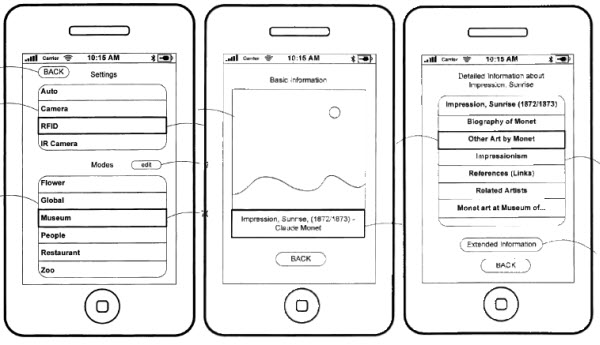
Systems and methods for identifying objects and providing information related to identified objects (# 20090175499)

Object Recognition

This patent filed by Apple shows a technology that would allow the user to point the iPhone’s camera at an object. The software would then recognize what the object is, then provide relevant additional information about it. The methods for recognition would be either image or camera recognition technologies, Barcode scanning, RFID tags or other similar technologies. Different modes could also be set up so that the recognition process would be easier based upon where you are such as a restaurant, museum etc.

Personal computing device control using face detection and recognition (#20090175509)

Facial Recognition

This patent describes the various techniques that Apple might use to the the iPhone the ability to recognize faces of which the camera is pointed at. If these methods are implemented, the facial recognition could add another layer of security to the phone by only allowing use by certain people or deciding whether or not to put the device to sleep.

WiFi Connectivity Problems Caused By iPhone OS 3.0

I for one have experienced connectivity problems with my iPhone 3G over WiFi. My signal is never as strong as it used iphone_os_3to be and even in the house I get no connection where I used to get a connection, all this after the 3.0 update.

Hundreds of people have been complaining of these issues of the iDevice not connecting to WiFi, less signal strength or saying you have a WiFi connection when you don’t.

Apple if fully aware of the problem and will be working to fix it. Some people think that the 3.1 update will fix these issues but some people don’t agree with this so we will have to see. If anyone is using 3.1 Beta do you experience any of the WiFi problems?

Some people have came up with many solutions to try and fix this problem, but they don’t work, some people even tried putting there iDevice in the freezer.

iPhone Battery & Heat Problems

Multiple cases of iPhone’s overheating and the battery of the phone quickly depleting have been causing iPhone users Apple iPhone 3G WWDC 2009problems recently. Most believe it’s down to the software, the 3.0 firmware that Apple released a few weeks ago as it only seems now that users are having these problems.

Apple blame the overheating on the hot weather and are blaming people for leaving there iPhone’s in hot places but the battery issues must be in some way connected to the new firmware as I experienced today.

My iPhone 3G which used to run 2.2.1 would run under moderate use each day without getting into the 20% battery area, with heavy usage it would get down quicker and I would have to charge. But today whilst at a friends house I decided to do some live streaming using Qik, however after about 10 minutes I noticed that my iPhone had heated up considerably and the battery had lost maybe 30/40% of it’s charge. Now I know for a fact this isn’t usual as I’ve used Qik before and the phone didn’t have the same problems using 2.2.1.

It seems that there must be something not quite right with the 3.0 firmware which is causing maybe the CPU to be overused, causing the phone to heat up or something in some setting which isn’t coded properly and causing these problems.

I’d be interested to try out the 3.1 Beta to see if it had the same issues, however I’m not currently a developer so can’t try it but if anyone has tried it leave a comment about if you experience the same issues.

ultrasn0w 0.8 Released

ultrasn0w 0.8 has been released today and is now fully working on the 3Gs.Jailbrake

The main 3GS ultrasn0w glitch on hacktivated devices is: need to do Settings->General->Reset->Reset Network settings once.

They have said that stability should be drastically improved for unltrasn0w on the 3GS, for some people however it may take up to 75 seconds after reboot.

To get ultrasn0w 0.8 add http://repo666.ultrasn0w.com/ to your sources.