Ultrasn0w Released!

The Dev-Team today announced the release of the avidly awaited Ultrasn0w soft unlcock for iPhone & iPhone 3G, not the Jailbrake3G S yet, as that’s not been jailbroken.

Follow these instructions to get Ultrasn0w:

  1. Ensure you have upgraded to iPhone OS 3.0
  2. Jailbreak your iPhone 3G using redsn0w or PwnageTool (this will also install Cydia/Icy)
  3. Run Cydia or Icy
  4. Please add the repo repo666.ultrasn0w.com to Cydia or Icy. That last “o” is actually the number zero “0”! If you use the letter “o” you’ll get an error.
  5. Search for ‘ultrasn0w’ in cydia or icy and install ultrasn0w
  6. Reboot your iPhone 3G
  7. T-Mobile USA users should disable 3G before using ultrasn0w
  8. Enjoy

How To Fix Cydia Problems in 3.0

Some of those who jailbroke 3.0, much like me may have experienced some problerms with Cydia, most of them will be Jailbrakesmall glitches which will be fixed in an update but for some you may have experienced this whilst trying to install Cydia downloads.

Cydia Error

Even though if you got this things normally still installed without a problem it was annoying having to go through this everytime you download and install something however there is a fix.

As this seems to only occur when you install All Sources from Steffwiz, uninstall it and the sources will still remain but the problem seems to go away.

The Dev-Team Have Jailbroken 3.0 [Updated]

For all those who updated the iPhone/iPod firmware to 3.o, like me, many of you will be waiting for a jailbrake for the JailbrakeiPhone Dev-Team. They have jailbroken the firmware, as they did the Beta’s but are trying to sort out some deep issues with the YouTube app, however as they stated on their blog:

“we’ll try our best to get it fixed but we may end up releasing a preliminary jailbreak in which YouTube doesn’t work for hacktivated devices, and then follow that up with a more complete jailbreak when we can.”

According to the Dev-Team’s blog however the YouTube app problem only affects those who unofficially activated their device, so for all the rest the more complete jailbrake wouldn’t be necessary.

The release of the tools to jailbrake the devices should of been released soon after Apple’s release of 3.0, however due to these completcations they should be releassed later today along with ultrasn0w. For those who have gotten a iPhone 3G S, you will have to wait a little while longer for the jailbrake.

Official Torrents:

PwnageTool 3.0 (Mac)
Redsn0w 0.7.1 (Windows)
Redsn0w 0.7 (Mac)

HTTP Downloads:

PwnageTool 3.0 (Mac)
Redsn0w 0.7.1 (Windows)
Redsn02 0.7 (Mac)

Enable Tethering On 3.0 Via iPhone Safari

For all those out there who need tethering. but cannot wait for there providers to roll out support, there is a very easy way for you to enable tethering on most networks across the world for free.

First head over to help.BenM.at in Safari on your iPhone.

Tethering_1

Select Mobileconfigs

Tethering_2

Select Your Country

Tethering_3

Select Provider

Tethering_4

Select Install

Tethering_5

Select Install Now

Tethering_6

Now go to Settings > General > Network > Internet Tethering > On, and now you have tethering.

Update: Some are reporting that this procedure could disable MMS and visual voicemail depending on your country and carrier.

Update 2: Techradar reports that O2 UK has responded to the tethering hack saying, “we reserve the right to charge customers making modem use of their iPhone or disconnect them.” This assumes O2 can identify such customers.

Changing Your Number In OS 3.0

A feature that I wanted in previous firmware, was the ability to change your number in the phone’s contact list, most people would not need this as they either buy the phone with a contract or PAYG sim and keep that number.

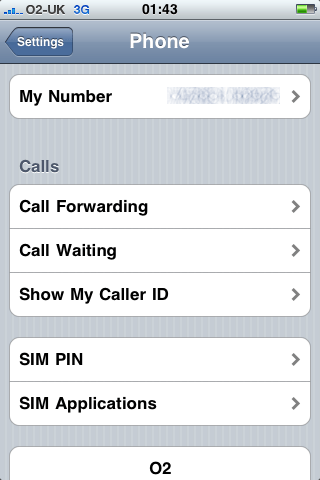
But for those who changed their number or put in a different sim card your number wouldn’t in iTunes or the iPhone’s contact list, but if you go to Settings > Phone > My Number  then you can now change the number if you’ve updated to the new firmware.

Phone Settings iPhone OS 3.0

O2 Announce Price’s For iPhone 3G S

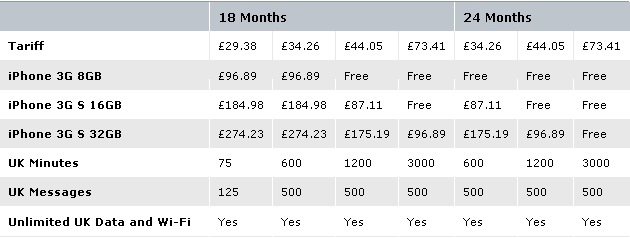
The UK iPhone provider O2, have announced the prices for the new iPhone 3G S. Here’s the break down:Apple iPhone 3G WWDC 2009

Pay As You Go:

  • iPhone 3G 8GB – £342.50
  • iPhone 3G S 16GB – £440.40
  • iPhone 3G S 32GB – £538.30

The iPhone 3G 8GB remains the same price as it was before on Pay As You Go, all iPhones on PAYG come with 12 months of free unlimited data.

Pay Monthly:

O2 Pay Monthly Prices

The iPhone 3G 8GB remains at the same price as before.

If you need business plans look here and if you need corporate plans go here.

Jailbreak For iPhone OS 3.0 Due Soon

Now that Apple has released iPhone OS 3.0, The Dev-Team can now release the jailbrake for the new firmware. There is Jailbrakealready a jailbrake for the beta’s of the new firmware but it’s not advised you use it, as it could have cause some problems.

The release is said to be shortly after the release of the firmware so keep your eyes on here and I will post when it’s been released with download links.

Just a note to those who jailbrake not all the Cydia/Icy app’s will work on 3.0 yet so don’t expect all of them to work straight away.

Also on friday, the Dev-Team will be releasing ultrasn0w which will allow you to unlock the new firmware.

iPhone OS 3.0 is Out Now!

iPhone OS 3.0 Software Update

For all those who haven’t been sitting constantly clicking the update button in iTunes, waiting for the new update or been complaining on Twitter how it was 5 minutes late, then to let you know the OS 3.0 firmware for iPod Touch and iPhone is out.

iPhone 1G – Download
iPhone 3G – Download

If your in the UK like me then you must update certain settings once you have upgraded to ensure your internet works and MMS.

These are for Pay As You Go Customers, for Pay Montly or other go here.

  • First change your APN from idata.o2.co.uk and enter payandgo.o2.co.uk (Passwords and username remain the same)
  • Repeat for MMS settings.
  • Turn the phone off, and then back on.
  • Send a text saying ‘MMS’ to 1010, once O2 has set up MMS for your account a MMS will be sent to you.