Coverage of Apple Music Event (1st September 2010)

I’ll be covering the latest news from the Apple event, check back at the times below on Wednesday, September 1st for all the action!

If your on a Mac or iOS device you can watch the event live from the Apple website, if your running Windows I’m afraid your out of luck.
07:00AM – Hawaii
10:00AM – Pacific
11:00AM – Mountain
12:00PM – Central
01:00PM – Eastern
06:00PM – London
07:00PM – Paris
09:00PM – Moscow
02:00AM – Tokyo (September 2nd)

Possible Next-Generation iPod Touch & iPod Nano Cases Appear Online

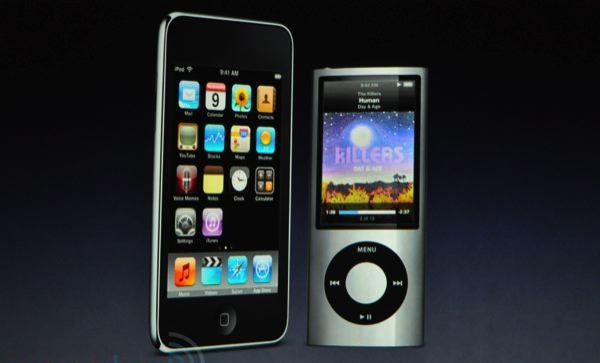
Less than a week before an Apple event is set to take place, cases for devices which have been rumored to be featured at the event appear online. The picture comes courtesy of Chinese case retailer X-Doria. The image seems to show what appears to be a 4th generation iPod Touch, which is rumored to have the front facing camera built-in for FaceTime.
The second case is said to be for the iPod Nano 6th generation, but it could easily be a case for a new iPod shuffle. It also appears to match a 1.7 inch Apple touchscreen that turned up in Taiwan.

The September event usually revolves around music and the iPod family so we know there’s updates coming just not sure on which devices.

Surik Creates Fix For PDF Security Issues

Surik, creator of the Cydia store has rolled out a patch that fixes PDF security issues that are fixed by the 4.0.2 update along with ones that Apple hasn’t fixed yet. Seems that if you want to be secure and protected the only thing to do is to jailbreak your device, escpailly if your running a first gen iPhone or iPod Touch. The package can be found in Cydia.

Related Articles:
How To: Change Your iPhone’s SSH Password

How To: Protect Your iDevice From PDF Exploits

For all those of you who have used the JailbreakMe.com method of jailbreaking then you took advantage of a PDF exploit in the Safari application. This is good that you can jailbreak your device so easily but it also means anyone with the right know how can run code on your iDevice. This means that if in the wrong hands it could be used for malicious purposes.

The iPhone Dev-Team or Apple will eventually patch the PDF hole, probably the latter. For now you need to make sure your device is protected so that you don’t fall into any malicious traps. You need to install a Cydia package called PDF Loading Warner, this package displays a pop-up when your device is about to open a PDF. It won’t stop this exploit but it will let you choose not to open a PDF that might be malicious. It has caused some issues with iBooks when opening PDF files as you have to dismiss the pop-up numerous times. However it’s a small price to pay for such an easy jailbreak.

iPhone iOS 4 Custom Firmware

Today PwnageTool 4 was released for the Mac and seeing as now I have a MacBook I thought I’d create some custom firmware for all you Windows users who don’t have an official tool as of yet.

Below are the links to the files, I will update them as I upload them and feel free to share this post with others.

Please read this Dev-Team article before using any of the custom restore files.

Details: Only non-hacktivated firmwares without Multitasking Enabled come with custom boot logos, root size is shown in brackets next to the device (I just used the default setting.)  Also baseband update is not enabled.

iPhone 3GS iOS 4 Custom Restore (Root Size 831MB)
Not Hacktivated (w/Custom Boot Logos) – iPhone2,1_4.0_8A293_Custom_Restore.ipsw
Not Hactivated – iPhone2,1_4.0_8A293_Custom_Restore_(Without_Custom_Boot_Logos).ipsw
Hactivated – iPhone2,1_4.0_8A293_Custom_Restore_(Hacktivated).ipsw

iPhone 3G iOS 4 Custom Restore (Root Size 756MB)
Not Hacktivated (w/Custom Boot Logos) – iPhone1,2_4.0_8A293_Custom_Restore.ipsw
Not Hacktivated – iPhone1,2_4.0_8A293_Custom_Restore_(Without_Custom_Boot_Logos).ipsw
Not Hactivated w/ Multitasking Enabled – iPhone1,2_4.0_8A293_Custom_Restore_(Multitasking_Enabled).ipsw
Hactivated – iPhone1,2_4.0_8A293_Custom_Restore_(Hactivated).ipsw
Hacktivated w/ Multitasking Enabled – iPhone1,2_4.0_8A293_Custom_Restore_(Hactivated_Multitasking_Enabled).ipsw

iPod Touch 2G iOS 4 Custom Restore (Root Size 688MB)
Without Multitasking Enabled (w/Custom Boot Logos) – iPod2,1_4.0_8A293_Custom_Restore.ipsw
Without Multitasking Enabled – iPod2,1__4.0_8A293_Custom_Restore_(Without_Custom_Boot_Logos).ipsw
With Multitasking Enabled – iPod2,1_4.0_8A293_Custom_Restore_(Multitasking_Enabled).ipsw

If you have any requests that aren’t shown above then get in touch via Twitter @sbraidley

iOS 4 GM Download

As promised below are the download links for all the iDevices, that support iOS 4.  Along with the beta of iTunes 9.2 which is required to upgrade to the GM release (build 8A293). These have been tested and will work and I’ve read that you don’t need your UUID to be linked to a developer account for it to work. Also there is a jailbreak for the GM release.

Download iOS 4 GM (build 8A293) for iPhone 3G
Download iOS 4 GM (build 8A293) for iPhone 3GS
Download iOS 4 GM (build 8A293) for iPod Touch 2G
Download iOS 4 GM (build 8A293) for iPod Touch 3G
Download iTunes 9.2 Beta

If you want to jailbreak then:
Download Redsn0w 0.9.5b4-2

View iOS 4 GM Folder (Contains all downloads)

These are just the files that can be used however use at your own risk as by downloading the files you accept full responsibility for any damages caused. If your looking for a jailbreak guide then I won’t be posting one here just the files. If you search for a guide there are plently, just give Google a search.

WWDC 2010 Keynote

Heres the local times that it begins at:

07:00AM – Hawaii
10:00AM – Pacific
11:00AM – Mountain
12:00PM – Central
01:00PM – Eastern
06:00PM – London
07:00PM – Paris
09:00PM – Moscow
02:00AM – Tokyo (June 8th)

Just a note normally I do a near live coverage of the events from Apple but due to prior plans I won’t be in from 6PM (London) till about 8 if not a bit later so I will still cover the event but it won’t be live as it has been at pervious events which is a shame as I’m really excited for this WWDC but I’ll still be keeping up on the events on my iPhone.

Live Coverage Of Apple Event 27/1/2010

All times are at GMT (London).

5:48 PM: Everyone is getting seated and the event will start in 12 minutes.

6:00 PM: The lights have gone down.

6:02 PM: “We want to kick of 2010 by introducing a magical and revolutionary product today… but first I have a few updates.”

6:05 PM: “Next update, the app store. We have over 140,000 apps, and a few weeks ago we announced a user downloaded 3 billion apps.”

6:08 PM: “SO all of us use laptops and smartphones… the question has arisen; is there room for something in the middle. We’ve wondered for years as well — in order to create that category, they have to be far better at doing some key tasks… better than the laptop, better than the smartphone.”

6:10 PM: “We think we’ve got something that is better. And we call it the iPad.”

6:28 PM: “Let’s go back to the hardware.” .5 inches thin, 1.5 pounds — 9.7 inch IPS display

6:28 PM: Full capacitive multitouch

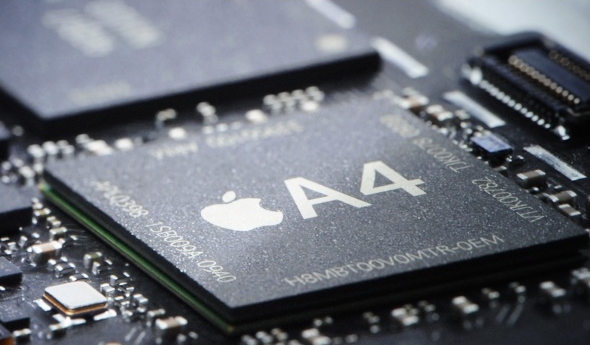
6:29 PM: “It’s powered by our own silicon. The 1GHz Apple A4 chip. It screams.”
6:29 PM: Available in 16GB, 32 and 64GB models.
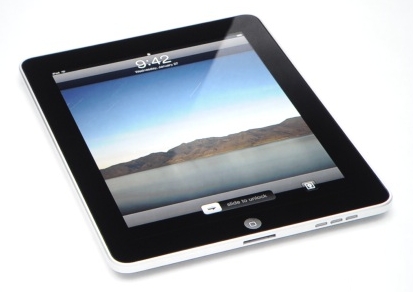
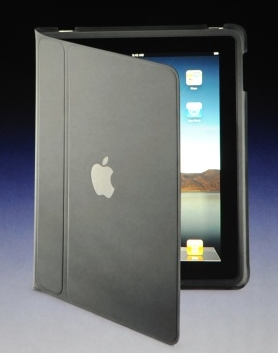
Apple iPad

6:29 PM: 802.11n WiFi, Speaker, Microphone, 30-pin connector and 10 hours of battery life, up to a month on standby. Bluetooth 2.1+ EDR.

6:54 PM: Apple eBook reader app called iBook.

6:55 PM: Apple uses the ePub format for the iBook app, which means it’s open.

7:13 PM: It syncs just like the iPhone and comes with 3G.

7:14 PM: $14.99 for 250MB of data or $29.99 for unlimited. Free use of AT&T WiFi Hotspots. No contract. International deals by June. iPad 3G models are unlocked.

7:17 PM: “WiFI plus 3G if you want it. So iPad. It’s phenomenal. Email is fantastic, best device for photos, great for music, great for video. It runs almost all of the 140k apps on the app store, as well as a whole new generation of apps.”
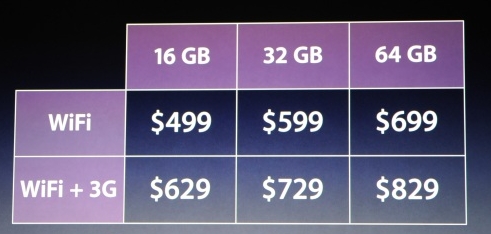
iPad Pricing

7:20 PM: “So $499 for 16GB of iPad. That’s our base model. 32GB is $599, 64GB is $799. 3G models cost an extra $130. $629, 729, and 829 with 3G.”

7:20 PM: “We will be shipping these in 60 days. 3G models will ship in 90 days.”
App Store Downloads Reach Three Billion

Apple today announced that more than three billion apps have been downloaded from its App Store by iPhone and iPod touch users worldwide. Thats around 5.5 million downloads per day!

“Three billion applications downloaded in less than 18 months—this is like nothing we’ve ever seen before,” said Steve Jobs, Apple’s CEO. “The revolutionary App Store offers iPhone and iPod touch users an experience unlike anything else available on other mobile devices, and we see no signs of the competition catching up anytime soon.”

iPhone and iPod touch customers in 77 countries worldwide can choose from an incredible range of apps in 20 categories, including games, business, news, sports, health, reference and travel.