After iTunes not wanting to restore my iPhone, I decided to use the now free, Find My iPhone service to remotely wipe my phone ready for my appointment at the Apple Store. After initiating the wipe I received an email saying it could take up to 2 hours to complete, my appointment being within the next hour didn’t help. Unfortunately I arrived late to the appointment, but my phone still hadn’t wiped. After not being seen I needed to use my phone again and it states in the email that you cannot cancel the wipe, however a hard reboot stopped the process and nothing had been deleted, within the hour that it was apparently wiping. So this displayed a massive flaw with the service to me, if a person was to steal a iOS device that was then remotely wiped, the theif could simply hard reboot the iOS device and have access to everything.
White iPhone 4 Finally On Sale
The news has been floating around the internet for a few days now that the white iPhone 4, would finally go on sale and it’s now official. Vodafone UK among others are set to release the white iPhone 4 along with Apple themselves. The official Apple site got updated just after midnight to reflect the arrival of the white iPhone 4 model. Hopefully this also means that there will be no delay in the upcoming next generation white iPhone.

Possible Pictures of Next Gen iPhone Leaked in China
What we have here are said to be pictures of the upcoming next generation of iPhone, known to be either the iPhone 4S or iPhone 5.

These pictures have been posed by Chris Chang on the M.I.C Gadget website, the photo appears to be the next generation iPhone which will no doubt be powered by the same A5 CPU that is in the iPad 2. This may not actually be the final design for the next generation iPhone, which is rumored to hit stores in September, but could of be one of the many prototypes that will have been made. There was talk a few weeks back of a edge-to-edge display, so this seems to back up those rumors.

How To: Disable iPhone Balance Notifications
iPhone balance notifications are probably the only downside to having an iPhone on Pay As You Go, every time you send a  message, make a phone call or use data without having a data package in place, you will have to dismiss your balance every time. It may be nice to sometimes see your balance, but if you send a lot of SMS messages like me then it soon gets frustrating.
I decided to research the subject a few months ago to see if there was any way of removing it, a few threads on some forums but no conclusive answer. I got in touch with O2 to get it removed but back then they told me that you couldn’t remove it. There was nothing in Cydia to get rid of it either. But yesterday I got in touch with O2 again, after reading that the carrier can turn it off at their end and I woke up this morning without having to see the balance notification screen. So to remove the balance screen just get in touch with your carrier, whether it be O2 or any other carrier worldwide and they should be able to disable it for you. I hope this has helped and leave your success stories in the comments.
A Little Update
You may have realized that over the past few months the blog has been pretty dead, this is due to a lot of different reasons but I’m going to start blogging frequently again, I’m not sure on the exact areas I will be blogging as it probably will expand from just Apple news. So expect to see more news and for those who visit the site for R5 release dates, those have finally been updated. The current list isn’t that bulked out yet, but I’m on the search for more dates so hopefully we will have a good healthy list again soon. Also I’m collecting dates for the other regions, I don’t have all the time in the world so if any of you readers have dates for any region then please send them over in an email, it’d be a great help to all of us.
I’d like to thank all my readers who visit the site everyday for staying with me, even when I haven’t been posting that much, it means a lot.
In other news, the blog has nearly hit 500,000 hits, and I think I’ll hit it even sooner now that I’m going to start blogging more again.
If you have any feedback or areas you want me to cover then leave a comment.
Cycorder Repair Service [Updated]
If you’ve ever used Cycorder and got a call or you’ve ran out of memory during a video you know how annoying it is when you go to the video and it won’t play. No matter how hard you try it won’t play back. Some people simply give up, others pay quite a lot of money to a repair company.
I’ve done quite a few videos now and my service has been fully tested and worked 100% of the time. So if you have corrupted Cycorder videos you want fixed or know someone who does I will get them fixed and back to you within less than 1 hour after payment in most cases.
Here’s how it works:
- Upload the video to WeTransfer (Up to 2GB)
- Send the file to sbraidley [at] yahoo.co.uk (include any discount codes at this point).
- I will then download and fix the file and email you with a quote of price and a screenshot of the video for proof if requested.
- Send the payment via PayPal in your preffered currency, either USD or GBP and make sure that it’s sent as Personal Payment Owed.
- Once payment is received I will immediately upload the file back to WeTransfer for you to download.
- You now have your fixed video.
At the minute I’m charging a flat fee of $25/£15.60 per GB (The price is determined by the repaired video size and not the corrupt video that is sent). The video can be any length and sound is also processed with the video unlike some other services. I can also promise that you file will never been seen by anyone but you, videos are checked that the process has worked but this does not require the video to be played.
Mac App Store Cracked Already

So it didn’t take long, the new Mac App Store was cracked within hours of it’s release. At current there are two weaknesses in the
anti-piracy system that has been deployed on the Mac App Store.
The first is down to developers mistakes, if they had followed Apple’s guidelines then this one wouldn’t of worked. Some applications just require you to copy the code signature and some other files from a free app, and paste those into a paid app to enable it to run. If the developers had of followed the guidelines then a check would occur where it checks the code signature ID to see if they match the app’s bundle ID.
The second exploit is the removal of the DRM, similar to what happened on the iPhone App Store. It uses an application known as ‘Kickback’, currently the application is unavailable but as soon as the Mac App Store becomes more populated I’m sure we will see the application surface.
How To: Enable HD Video Recording on The iPhone 3GS
Mike Pan has successfully modified system files on the iPhone 3GS to record HD video at 30fps.
The video is recorded at 1080×800 at up to 20Mbps, this is a big improvement from the default 640×480 at 3Mbps. The unusual size is used to keep the video at the right aspect ratio when recording. You can also change the resolution to 960×720 if you so prefer.
It does take a little longer for the 3GS to focus and the quality won’t be as good as that on the iPhone 4 but it’s a nice improvement especially if you’re not moving the phone a lot.
First of all make sure you have a jailbroken iPhone 3GS on iOS 4.1, then ensure you install OpenSSH and you know your iPhone’s IP Address. Next download the relevant patch files, depending on your resolution prefenrence.
Once you have downloaded the relevant patch extract it. In the extracted folder you should have the following files:

Launch your favourite SSH client and connect to your iPhone. Once you’ve connected navigate to /System/Library/CoreServices/SpringBoard.app/
Now locate the file N88AP.plist, rename it and add .bak to the end of the filename, this will act as a backup file so that you can revert to the original setting.
Now drag the N88AP.plist that you downloaded and put it in the same folder as the original was in.
Now navigate to /System/Library/PrivateFrameworks/Celestial.framework/N88/
Now locate the files:
– AVCapture.plist
– CameraRollValidator.plist
– MediaValidator.plist
Rename them all and add .bak to the end of the filenames.
Now drag the AVCapture.plist, CameraRollValidator.plist, and MediaValidator.plist files that you downloaded and put it in the same folder as you just navigated to.
Now just restart your iPhone 3GS and your HD video recording will be enabled.
FaceTime for Mac beta Released
One of the smaller announcements from todays event is FaceTime now has it’s own app for Mac and although it’s in beta it works just like you’d expect. It imports your contacts and then allows you to call either their phone number or email address of the other device and will attempt to call them. I’ve tried calling my MacBook from my iPhone 4 and vice versa and it both cases it worked flawlessly. The best thing is there is nothing to set up it’s just ready to go straight away. Hopefully we will see this technology being deployed in Windows and Linux soon but for now if your on a Mac and know someone with a FaceTime capable device then install it now and give them a surprise call.

Limera1n Released A Day Prior To greenpois0n’s Release
In the last few hours a big disruption in the jailbreak scene with the release of limera1n, the untethered jailbreak from geohot.  That’s right the same geohot who left the jailbreak scene after he kept getting pestered by people about jailbreak releases. Over the last 6 months, geohot has been working on the jailbreak for the last 6 months. On the website, over at limera1n.com, it says that it’s unpatchable and that it will work on the iPad, iPod Touch 3G, iPhone 3GS, iPhone 4 and iPod Touch 4G on the firmware 4.0 and above. This jailbreak is in beta and so is very messy and so MusleNerd of the Chronic Dev-Team has said on Twitter to wait for the release of greenpois0n.
The limera1n jailbreak is only currently avaliable for Windows but geohot is working on a Mac & Linux version of the software. There have been a few reported issues with the jailbreak so far such as the 3GS new bootrom not being supported. The release comes a day before The Chronic Dev-Teams release of their untethered jailbreak greenpois0n, which uses a different exploit.
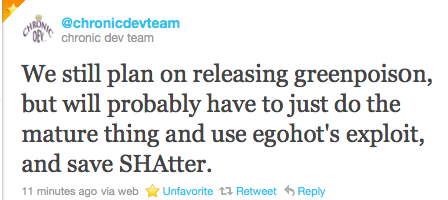
Currently it’s not known what The Chronic Dev-Team will do as they have 3 options available to them, they can either: not release greenpois0n and save the exploit, release the greenpois0n jailbreak and use a second exploit or use geohot’s exploit and then possibly break the ETA of 10:10:10 10/10/10 GMT.
It seems that geohot has done thing on purpose but has released in a sense, an incomplete solution just to spite The Chronic Dev-Team and their efforts. The Chronic Dev-Team are still talking at this point and trying to come to a decision of what to do, the best decision in most peoples opinion would be for them to implement the limera1n exploit and keep the SHAtter exploit for future releases.
If your thinking of using the limera1n release please know that the iPhone Dev-Team and The Chronic Dev-Team were not involved in it’s creation and therefore any issues caused by it shouldn’t have to be fixed by them as it’s geohot’s software which he choose to release in beta. I would recommend waiting for the greenpoison release, it may take a few more days but at least you’ll know all the issues will be fixed. I’ll keep everyone updated on the happenings in the jailbreak scene, make sure to check back frequently for any updates.
Update: The Chronic Dev-Team have chosed to release the greenpois0n jailbreak tool using geohot’s exploit and not the SHAtter exploit.
 Sam's Blog
You must be logged in to post a comment.