The New iPhone Ideas

iphone30So with WWDC rolling ever closer we’re expecting the release of a new iPhone. With the references found in the firmware and the release of the new iPhone OS 3.0 all arrows are pointing to a new phone. But what will change and what will remain.

  • The screen on the device will most likely remain the same, or at least the same resolution as all the App’s for iPhone and iPod Touch are programmed to a certain size so it’s unlikely they change the screen size.
  • Improved battery life, this will be a great impovement, hopefully the new iPhone software has some tweaks to keep usage down and maybe a better battery in the new device.
  • A better camera is almost certain seeing as Apple want to compete with other phones on the market and the fact they orderes 3.2 and 5 megapixel sensors.
  • More RAM, so that we can have App’s running without crashing.
  • Faster CPU, the iPod Touch 2G has a faster processor than the iPhone so it’s time for an upgrade for it to run games and App’s more smoothly and quickly. However, this will mean that hacking the device will take longer as it did for the iPod Touch due to the new processor.
  • Video Recording has been rumoured with screenshots and is technically possible as shown by Cycorder, the jailbroken video recording App.
  • Bigger Capacity, 8GB will probably be dropped and 16GB and 32GB brought in.
  • Zoom on the camera, due to the fact if they have a bigger sensor the image won’t look as bad.

All of these are just based on rumour or idea of what the new iPhone will have. Now we just have to wait till June time for more info on the possibility of the next iPhone.
How To Use iPhone OS 3.0 Beta Without Activation

iphone30For some people they are too eager to try the new iPhone OS to wait, you may have read of the problems that many of them run into but here’s a way round it.
The way we stop the verification is not disconnecting from the internet each time but stopping iTunes contacting the verification server.

Note: this is a Windows tutorial not Mac.

First of all open Notepad.

Click on File > Open and ensure that your viewing All files and not just .txt files.

Now go to   C:\Windows\System32\drivers\etc

Now find the file ‘hosts’ and open it.

Go to the bottom of the file and paste the following:

127.0.0.1    albert.apple.com

Now save the file making sure iTunes isn’t open.

Note: this will just stop the verification, you can still use the iTunes store.

iPhone Twitter Push Notification Mockups

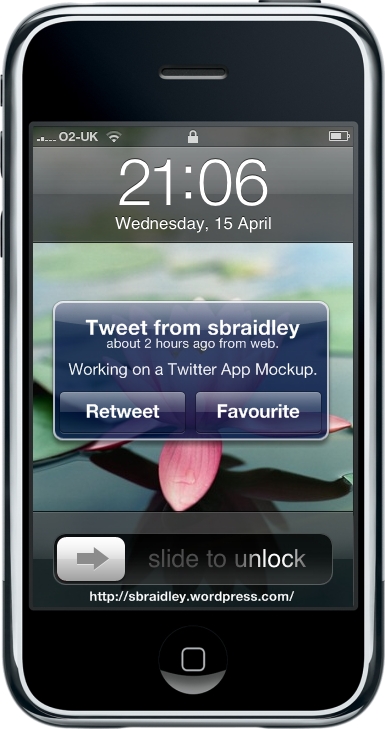
This is a mockup I’ve just came up with, that would be good for Twitter App’s. However if your one of those people who follow 100’s of people then this wouldn’t be very good, unless maybe for direct messages on Twitter.

Twitter iPhone Mockup

The font isn’t perfect as I didn’t use Photoshop so no shadows were placed on the text but as you can see it would be a good way for Twitter App’s to push tweets or direct replies/messages.

Update: Here’s a second mockup which would appear if you get multiple tweets.

Twitter iPhone Mockup 2

Hacker Enables Tethering in iPhone OS 3.0

Steve Troughton-Smith of Ireland, whilst he “was hacking around with APNs in the Carrier.bundle itcc file” managed to work out how to tether his iPhone 3G over USB.

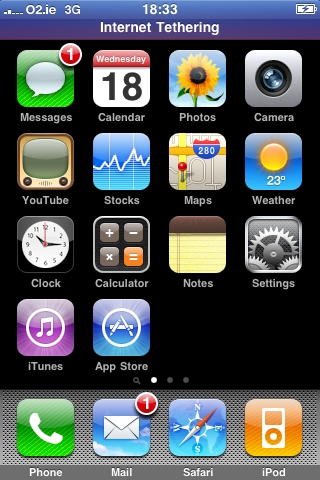
Tethering Homescreen
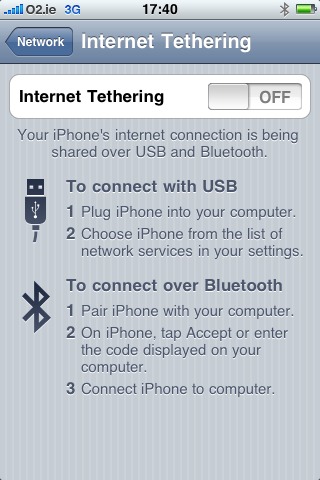
Thethering Prefs


Apple did confirm that Tethering was in OS 3.0 but that it was dependent on carriers choice to weather or not it would be enabled.

For people who are unaware of what tethering is, it’s using the iPhone’s EDGE or 3G connection and using it on a computer which the phone is either attached over USB or Bluetooth, sharing the connection so that if you have no WiFi and you don’t have a 3G card you could just plug in your iPhone and browse away.

Tethering, Video Publishing & Find MyiPhone found in OS 3.0

iphone30

Numerous online sources have confirmed that USB tethering, publishing video to MobileMe & Find MyiPhone are in the iPhone OS 3.0.

Tethering we knew may be included but it will depend on the carriers, to weather of not it is impletmeted.
Find MyiPhone would be very useful if you left your phone somewhere accidently, I assume it will use the aGPS, Cell Tower and WiFi triangulation to find the phone via MobileMe.
The fact that you can post video shows promising ideas for the future, however with no video recording app, unless jailbroken, this feature won’t be of much use.

iPhone OS 3.0 Features Without the Wait

Many of the new features coming with the new iPhone OS are features that are already available and also one’s we wanted, but didn’t get are also available.

Now for these you do have to jailbrake your iPhone/iPod Touch, which as Apple recently stated is illegal, so we don’t encourage you to do this but we are giving you the information so that if you wish to do so then you know how.

First of you must Jailbrake you iPhone or iPod Touch now for this go to the QuickPWN site or for more information go to the Dev-Team’s Blog.

Cydia

The features, followed by there Jailbroken alternatives (available on Cydia):

Copy & Paste – hClipboard

Video Recording – Cycorder

Flash – iMobileCinema

Background Processes – Backgrounder

Tethering – Modem

Spotlight – Searcher

MMS – SwirlyMMS

YouTube Downloading – MxTube

Organised Icons – Categories

They may not be exactly like how Apple has implemted them in the 3.0 OS, but whilst you wait for the release of OS 3.0, you can give these a shot.

Video Recording on iPhone Damaging?

One of the many features user’s wanted in the iPhone OS 3.0 Update, was Video Recording Functionality, but Apple did not deliver this. They didn’t specify why at the event but Kevin Rose, on the live episode (Episode 194) of Diggnation stated that according to his sources, who were right before, said that the reason Video Recording was not included was due to the NAND memory and technical issues. Being that writing to NAND memory too many times or too fast will mess it up, as Kevin Rose said on the show.

Cycorder on iPhone 3G

This rises a question to me, if you’ve jailbroken your phone, like myself and are using Cycorder or one of the other video app’s for iPhone, does this mean we could be damaging our phones. It’s made me think, weather of not I should use it again as if someone inside Apple said techinical problems are holding it back, do I want to mess up my iPhone?

iPhone OS 3.0 Update Info

iphone30

Apple have just had there iPhone OS 3.0 Preview event down in Cupertino.
It seems like finally they have listened to a lot of the public’s outcry, it may of took them a while but at least they got there.

The beta of this update is avaiable to developers now and will be out in this Summer to the rest of us. It will be free to all iPhone 3G users and $9.95 for iPod Touch users. It will work on the first gen iPhone but due to hardware limitations MMS and AD2P will not work on the first gen device.

App & Developer Functionality

  • Peer-to-peer connectivity over Bluetooth for gaming and other info-swapping.
  • Paid apps will have the potential to be subscription fee-based, and can include optional paid content that can be bought from right inside the app.
  • Developers can now build apps that call out to Google Maps, and can also finally bring turn-by-turn to the phone.
  • Devs can also connect with hardware accessories over in their apps now.
  • Long-promised push functionality will at last be included, but apps won’t run in the background.
  • Developers can add streaming video and audio to their apps, along with in-game voice use.


General functionality

  • Cut, copy and paste. At last! You can shake the phone to undo and redo the action, and it works with both text and photos, allowing Mail to send multiple photos at a time.
  • MMS, along with forward and delete for multiple messages.
  • A2DP stereo Bluetooth.
  • Unlocked Bluetooth functionality on 2G iPod touch.
  • Spotlight has been added to a new home screen page to the left of existing pages, allowing for universal search on the phone.
  • Tethering is built into 3.0
  • App Store will be available in 77 countries.

Apple Apps

  • A new app called Voice Memos which lets you record notes and reminders.
  • A revised Stocks app, with news stories and a landscape view.
  • Landscape keyboard available in all major apps.
  • CalDAV support has been added to Calendar, along with subscriptions support in the .ics format.
  • Apple’s major apps have all been expanded with search functionality.
  • Note Sync to sync your notes.
  • YouTube account support.
  • Form auto-fill.
  • Phishing protection.