ultrasn0w 0.8 Released

ultrasn0w 0.8 has been released today and is now fully working on the 3Gs.Jailbrake

The main 3GS ultrasn0w glitch on hacktivated devices is: need to do Settings->General->Reset->Reset Network settings once.

They have said that stability should be drastically improved for unltrasn0w on the 3GS, for some people however it may take up to 75 seconds after reboot.

To get ultrasn0w 0.8 add http://repo666.ultrasn0w.com/ to your sources.

New Features in iPhone OS 3.1 Beta

Apple released the iPhone OS & SDK 3.1 Beta yesterday. Here’s a list of what people have found to be changed so far:Apple iPhone 3G WWDC 2009

– MMS is now enabled by default (Still not supported by AT&T).
– A “Fraud Protection” toggle is now available in Safari settings.
– Voice Control over Bluetooth is now available, allowing users to Initiate calls and control music playback via Bluetooth headsets.
– iPhone startup and shutdown and app launching times have improved.
– Trimming video clips on the iPhone 3GS now offers the ability to save the edited version as a copy rather than simply overwriting the original file.
– New APIs allow developers of third-party application to access and edit videos.
– iPhone vibrates when rearranging Home screen icons.
– OpenGL and Quartz have seen improvements.

Apple Releases iPhone Firmware & SDK 3.1 Beta

Apple today, released the 3.1 beta for the iPhone firmware and SDK; both the SDK and the firmware are available for Apple iPhone 3G WWDC 2009testing and development to paid members of the iPhone developer program. Although this is pre-release software and details should remain under NDA, some details will leak out soon.

Some wonder why Apple have released the 3.1 Beta so close to the release of 3.0 to the public. Some think that it’s not just bug fixes, as Apple would probably release it as 3.0.1 if so. Apple may have worked out the exploit in which the Dev-Team use to jailbrake devices and patched it in this new release, so upgrading is to be taken at your own risk and may stop you from jailbraking until the Dev-Team work it out.

iPhone OS 3.1 Beta

Stack v3 Review [Updated]

stack3a1

Stack v3 for iPhone is the latest project from Steve Troughton-Smith, the project brings the Mac dock Stack feature to the iPhone in true style.

Stackv3_1

Shown above is the fan style which fans out the icons of added apps much like on the Mac does with files. The stack can be placed anywhere on the dock. The function of Stack for iPhone is to give a quick and easy access to your most used apps to save time from switching between screens.

Stackv3_2

This shows the grid view which Mac users will also be familiar with, this gives the user a lot more space to have there most used apps compared to the fan view.

Stackv3_3

To add an app to the Stack just drag it onto the icon and it will be added. To remove an app open the Stack and hold down then move your finger to bring up the shown notification which allows you to remove the app, this can be turned off in the settings to just remove without asking you first.

Stackv3_4

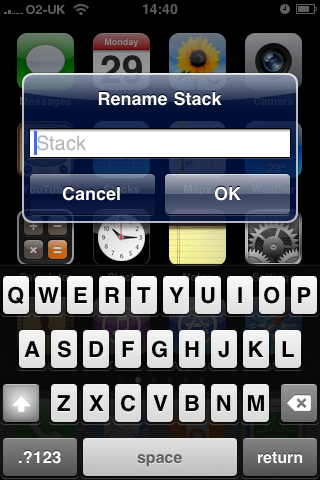
In the latest alpha (6b), the stack rename feature has been activated and allows you to rename the Stack so it appears to be a normal app.
Stackv3_alpha6b

Once the Stack has been renamed, you must re-spring the springboard for it to take effect.

Overall the Stack app is very stable and although in alpha, I have experienced few problems with it; there may be the odd UI tweaks needed here and there, but overall the app works amazingly well for those searching for a quick way to access apps.

As the Stack v3 is currently in alpha, to get a copy you must donate via the official site to get a copy, plus I must add it is only for Jailbroken devices, as Apple wouldn’t allow this sort of app. If you wish to test out the previous version for free then go here.

The project shows a lot of potential and I’m very excited to see what else can be added to this and keep following the developers twitter to get updates on the project along with others.

I’d like to thank Steve Troughton-Smith for allowing me to get hold of the alpha so that I could write this review.

Stack v3 Alpha Review Coming Soon

If your an iPhone owner you will of most likely have heard of, or used one of Steve Troughton-Smith’s app’s at some point or at least heard of them. He was the one who worked out how to tether the iPhone months ago.

He currently has 6 projects listed on his official website some of which are App Store approved, others are available via Cydia, however a project he’s been working on a lot recently is the Stack app, which gives the iPhone and dock like Stack feature. The new v3 has a lot of things to look forward to and the early alphas are promising, I’ve got hold of the alpha earlier and will be writing up a full review over the weekend.

Stack v3 Alpha

The Dev-Team Have Jailbroken 3.0 [Updated]

For all those who updated the iPhone/iPod firmware to 3.o, like me, many of you will be waiting for a jailbrake for the JailbrakeiPhone Dev-Team. They have jailbroken the firmware, as they did the Beta’s but are trying to sort out some deep issues with the YouTube app, however as they stated on their blog:

“we’ll try our best to get it fixed but we may end up releasing a preliminary jailbreak in which YouTube doesn’t work for hacktivated devices, and then follow that up with a more complete jailbreak when we can.”

According to the Dev-Team’s blog however the YouTube app problem only affects those who unofficially activated their device, so for all the rest the more complete jailbrake wouldn’t be necessary.

The release of the tools to jailbrake the devices should of been released soon after Apple’s release of 3.0, however due to these completcations they should be releassed later today along with ultrasn0w. For those who have gotten a iPhone 3G S, you will have to wait a little while longer for the jailbrake.

Official Torrents:

PwnageTool 3.0 (Mac)
Redsn0w 0.7.1 (Windows)
Redsn0w 0.7 (Mac)

HTTP Downloads:

PwnageTool 3.0 (Mac)
Redsn0w 0.7.1 (Windows)
Redsn02 0.7 (Mac)

Enable Tethering On 3.0 Via iPhone Safari

For all those out there who need tethering. but cannot wait for there providers to roll out support, there is a very easy way for you to enable tethering on most networks across the world for free.

First head over to help.BenM.at in Safari on your iPhone.

Tethering_1

Select Mobileconfigs

Tethering_2

Select Your Country

Tethering_3

Select Provider

Tethering_4

Select Install

Tethering_5

Select Install Now

Tethering_6

Now go to Settings > General > Network > Internet Tethering > On, and now you have tethering.

Update: Some are reporting that this procedure could disable MMS and visual voicemail depending on your country and carrier.

Update 2: Techradar reports that O2 UK has responded to the tethering hack saying, “we reserve the right to charge customers making modem use of their iPhone or disconnect them.” This assumes O2 can identify such customers.

Changing Your Number In OS 3.0

A feature that I wanted in previous firmware, was the ability to change your number in the phone’s contact list, most people would not need this as they either buy the phone with a contract or PAYG sim and keep that number.

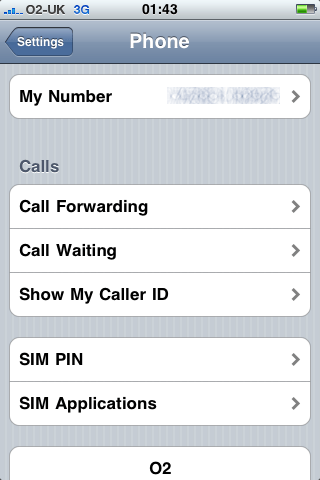
But for those who changed their number or put in a different sim card your number wouldn’t in iTunes or the iPhone’s contact list, but if you go to Settings > Phone > My Number  then you can now change the number if you’ve updated to the new firmware.

Phone Settings iPhone OS 3.0